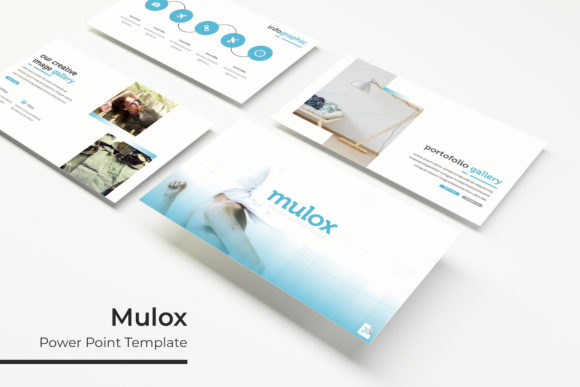
Mulox Power Point Template: Streamline Your Presentation Workflow
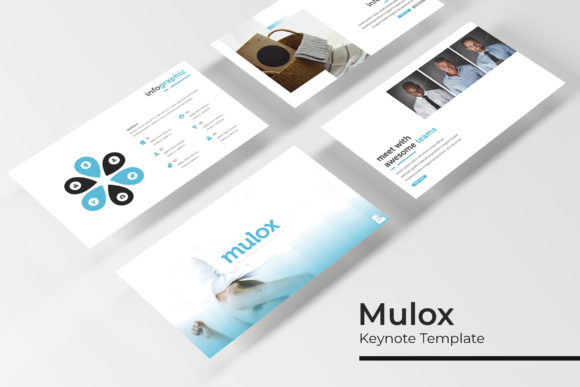
The Mulox Power Point Template is a versatile and professional design solution tailored for individuals and teams looking to create visually compelling presentations with ease. Whether you're preparing a business pitch, delivering a lecture, or showcasing creative work, this template offers a structured approach to presentation design that aligns with modern workflow needs.
Designed with a focus on usability and flexibility, the Mulox Power Point Template integrates seamlessly into various stages of project planning, execution, and delivery. Its comprehensive set of features ensures that users can maintain consistency across slides while adapting to specific content requirements.
Key Features of Mulox Power Point Template
The Mulox Power Point Template includes 150 total slides, divided into five premade color variations, each containing 30 slides. This structure allows for customization while maintaining a cohesive visual identity. The five color options provide a foundation for branding or thematic alignment, making it easier to match the template to your personal or organizational style.
A standout feature of the template is the handcrafted infographic section, which supports data visualization and storytelling. These infographics are designed to be both informative and aesthetically pleasing, helping presenters convey complex ideas in an engaging manner. The inclusion of section break slides ensures smooth transitions between different parts of a presentation, enhancing overall flow and structure.
The template also includes gallery and portfolio slides, ideal for showcasing projects, products, or creative work. These slides are fully resizable and editable, allowing users to customize graphic and picture placeholders without compromising the integrity of the design. The drag-and-drop functionality simplifies the process of adding and arranging visual elements, saving time during the creation phase.
Integration with Other Tools and Resources
The Mulox Power Point Template is designed to work alongside other tools and resources commonly used in professional and creative workflows. For instance, its compatibility with master slides ensures that changes made to a single slide are reflected across all related slides, promoting efficiency and reducing the need for repetitive edits.
The template’s pixel-perfect illustrations make it easy to integrate with other design assets, such as icons, charts, and diagrams created in graphic design software. This level of detail ensures that the final presentation maintains a high standard of quality, regardless of the source of additional visual elements.
Additionally, the template includes a readme file that provides essential information about the fonts used. The primary font is a free download, making it accessible for users who may not have premium font subscriptions. This feature supports cost-effective presentation development without sacrificing visual appeal.
Practical Use Cases and Workflow Examples
The Mulox Power Point Template can be used at multiple stages of a project or task. Before starting a presentation, users can leverage the template to outline key points, organize content, and plan the visual structure. This early-stage use helps ensure that the final output is both coherent and visually consistent.
During the creation process, the template’s pre-designed slides serve as a starting point, reducing the time required to build individual slides from scratch. The ability to customize color schemes and layout options allows for quick adjustments based on feedback or evolving requirements. For example, a marketing team might use the template to develop a campaign pitch, adjusting the color scheme to match brand guidelines and incorporating relevant infographics to support their message.
After a project is complete, the template can be repurposed for documentation or follow-up materials. The consistent design language ensures that these materials align with previous presentations, reinforcing brand identity and professionalism. A teacher, for instance, might reuse the template for lesson plans or student assessments, maintaining a uniform look across educational resources.
Factors to Consider for Effective Implementation
To get the most out of the Mulox Power Point Template, users should consider several factors related to preparation, usability, and long-term use. Preparation involves understanding the purpose of the presentation and identifying the key messages that need to be conveyed. This clarity helps in selecting the appropriate slides and customizing the template to meet specific goals.
Usability is another critical aspect. The template’s drag-and-drop functionality and editable placeholders make it user-friendly, even for those with limited design experience. However, users should take the time to familiarize themselves with the structure of the slides to avoid potential formatting issues. For example, resizing images or adjusting text boxes without disrupting the layout requires attention to detail.
Organization plays a significant role in maximizing the template’s benefits. By grouping related slides and using section break slides effectively, users can create a logical flow that enhances the audience’s understanding. This organization is particularly important for longer presentations, where maintaining a clear structure is essential for engagement and retention.
Efficiency and consistency are also key considerations. The template’s master slide feature ensures that design elements remain uniform throughout the presentation, reducing the risk of inconsistencies that could detract from the overall message. This consistency is especially valuable in professional settings where a polished appearance is crucial.
Long-Term Use and Maintenance
The Mulox Power Point Template is designed for long-term use, offering a reliable foundation for future presentations. As users become more familiar with the template, they can streamline their workflow by reusing slides and applying consistent design principles. This approach not only saves time but also ensures that all materials maintain a professional appearance.
Maintenance of the template involves keeping track of updates and ensuring compatibility with new versions of PowerPoint. While the template itself is stable, users should periodically review their files to ensure that all elements function correctly. This proactive approach helps prevent potential issues that could arise from software changes or file corruption.
Finally, the template’s versatility makes it suitable for a wide range of use cases, from business presentations to educational materials. By adapting the template to different contexts, users can continue to benefit from its features over time, making it a valuable asset in their professional toolkit.