Maze Power Point Template: A Comprehensive Overview
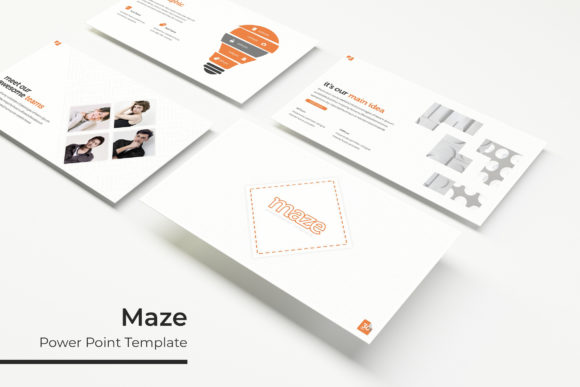
The Maze Power Point Template is a versatile and professionally designed presentation tool that offers users a structured approach to creating visually engaging slides. With 150 total slides, it provides a comprehensive set of materials for various presentation needs. The template includes five premade color schemes, with 30 slides dedicated to each, allowing for customization and flexibility in design. This makes it an ideal choice for professionals who want to maintain a consistent visual identity while adapting to different project requirements.
Key Features of the Maze Power Point Template
The Maze Power Point Template stands out due to its extensive range of features. One of the most notable aspects is the inclusion of handcrafted infographics, which are designed to enhance the clarity and impact of data-driven presentations. These infographics are fully editable, enabling users to tailor them to their specific content and messaging.
In addition to the infographics, the template offers section break slides that help organize content into distinct sections. This feature is particularly useful for long presentations, as it allows presenters to structure their material logically and guide the audience through complex topics. The gallery and portfolio slides further expand the template's utility, providing a professional way to showcase projects, case studies, or creative work.
The template also includes resizable and editable graphic picture placeholders, making it easy to insert and adjust images without compromising the overall design. These placeholders are drag-and-drop enabled, ensuring a smooth workflow for users who may not have advanced design skills. The pixel-perfect illustrations included in the template add a level of polish and professionalism that can elevate any presentation.
What’s Included in the Maze Power Point Template
The Maze Power Point Template comes with five PPTX files, each available in widescreen format. This ensures compatibility with modern projectors and display systems, providing a more immersive viewing experience. The five premade color variations allow users to choose a theme that aligns with their brand or personal style, offering a quick start for those who prefer a ready-made aesthetic.
A detailed readme file is also included, guiding users through the setup process and explaining how to use the various elements of the template. Additionally, the template features a free font download link, ensuring that users can access the same typography used in the design without additional costs.
It is important to note that while the template includes sample images and photographs for illustration purposes, these are not included in the final download. Users are advised to source their own images or use stock photography to avoid copyright issues.
When the Maze Power Point Template Is a Strong Fit
The Maze Power Point Template is well-suited for individuals and organizations that require a structured yet customizable presentation solution. It is particularly beneficial for educators, business professionals, and creatives who need to deliver clear and visually appealing presentations on a regular basis.
For those working on projects that involve data visualization, the handcrafted infographics and section break slides provide a powerful toolkit for organizing and presenting information. The template’s focus on usability and design makes it an excellent choice for users who want to save time while maintaining a high standard of quality.
Additionally, the template’s support for multiple color variations and editable graphics makes it a good fit for teams or organizations that need to maintain a cohesive brand identity across multiple presentations.
Considerations and Tradeoffs
While the Maze Power Point Template offers a wide range of features, it is essential to consider its limitations. For instance, the template may not be suitable for users who require highly unique or custom designs beyond the provided options. The pre-designed elements may limit creativity for those looking for a completely original look.
Another consideration is the learning curve associated with using a complex template. While the drag-and-drop functionality simplifies some aspects of the process, users unfamiliar with PowerPoint may need time to become comfortable with the structure and layout of the template.
Furthermore, since the template does not include actual photographs or images, users will need to source their own media, which could add to the overall preparation time and cost.
Alternatives Worth Considering
For users seeking more customization, alternative templates may offer greater flexibility. Some presentation templates provide more open-ended design elements, allowing for a more personalized approach. Additionally, users who prefer minimalist designs may find other templates more aligned with their aesthetic preferences.
Those who require more specialized features, such as interactive elements or animation tools, may benefit from exploring other presentation solutions. However, the Maze Power Point Template remains a strong option for users who value structure, ease of use, and professional aesthetics.
Practical Decision-Making Insights
When evaluating the Maze Power Point Template, users should consider their specific needs and goals. If the primary objective is to create a polished, organized presentation quickly, this template is a solid choice. However, if the goal is to achieve a highly customized or unique design, additional research into other options may be necessary.
Users should also assess their comfort level with PowerPoint and their ability to work within a structured template. Those who are new to presentation design may find the template’s organization helpful, while experienced users may prefer more open-ended tools.
Ultimately, the Maze Power Point Template is a valuable resource for anyone looking to enhance their presentation skills while maintaining a professional appearance. By understanding its strengths and limitations, users can make informed decisions about whether it aligns with their needs and objectives.